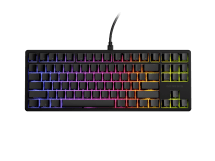


For years, choosing a keyboard meant having to make a significant compromise. On the one hand, users had access to flat, quiet membrane or scissor-switch designs familiar from laptops—comfortable for typing for hours on end, but lacking in precision, distinct tactile feedback, and durability. On the other hand, there were classic mechanical keyboards: extremely durable and fast, but featuring tall keycaps and a long key travel that many people found tiring during daily use.
Construction and Mechanics—What Sets Low-Profile Tires Apart from Classic Ones?
The term “low profile” does not refer solely to a thinner case, but to the entire keyboard architecture, which consists of three elements: a lowered base, slimmer keycaps, and redesigned, flattened switches.
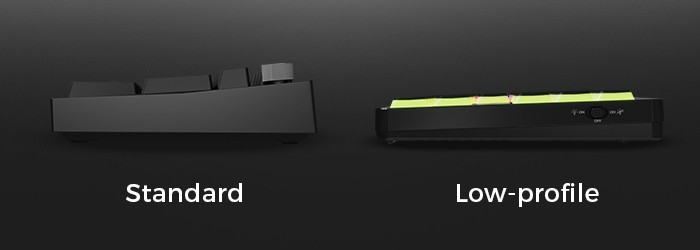
The difference between a standard keyboard and a low-profile keyboard is noticeable. Source: our own materials.
In a standard mechanical keyboard, the total switch travel is typically about 4 mm, and the click registration point (activation point) occurs halfway through this travel, or at about 2 mm. In low-profile designs, the total travel is significantly shorter —the switches have a shorter stem and a shorter spring, allowing activation to occur as early as 1.2–1.5 mm.
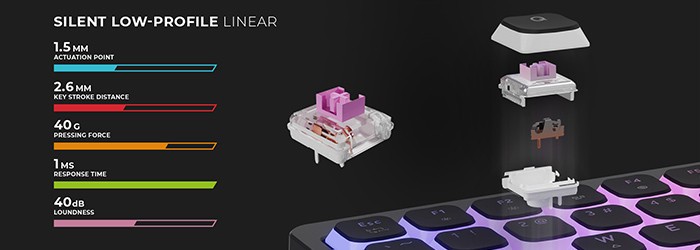
The difference in how the switches operate is one of the most important factors to consider when choosing between a low-profile and a standard model. Source: own materials.
A difference of a few fractions of a millimeter may seem insignificant on paper, but in practice it completely changes the feel of the keys under your fingers: the key requires less movement to activate and returns to its original position more quickly.
Ergonomics, Speed, and Work Culture in Practice
The change in the keyboard's geometry directly affects three areas that are important both during gameplay and while working at a desk for hours on end:
- Natural wrist positioning—the high front edge of traditional mechanical keyboards forces the hands into a so-called dorsal flexion, which during long typing sessions leads to tension in the forearm muscles and often requires the use of additional wrist rests. The low-profile case sits much closer to the desk surface, allowing you to keep your wrists in a more neutral, flat position.
- Shorter physical response time – in fast-paced online games (FPS, MOBA), the advantage isn’t determined solely by electronics and a 1,000 Hz polling rate, but also by the time it takes to physically press a key. A lower actuation point, combined with low actuation force, allows you to execute movement sequences faster and with less finger strain.
- Smooth typing and fewer typos—people accustomed to laptop keyboards adapt to the low-profile layout almost immediately. The flat keycaps make it easy to move your fingers smoothly between adjacent keys without the risk of catching on the raised edges of neighboring keycaps.
- Organization and portability—the slim design takes up less space both visually and physically, and when combined with compact form factors (such as a TKL keyboard without a number pad), it makes it easier to carry the device in a backpack alongside a laptop.
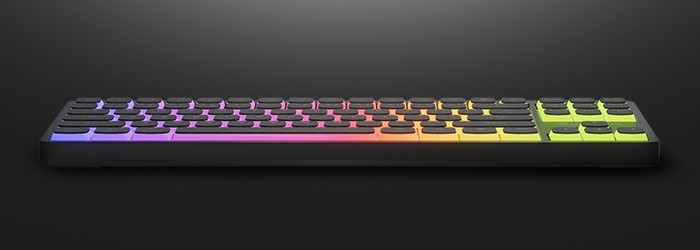
Elegant, comfortable, and... low. Source: our own materials.
Modern low-profile design—no more compromises on sound quality
The first generations of low-profile mechanical keyboards had their limitations. The limited space inside the case meant that these designs often felt stiff, produced a hollow echo while typing, and the factory-soldered switches made it impossible to replace them. Modern models effectively eliminate these issues by incorporating solutions familiar from the custom keyboard segment into slim enclosures.
A good example of this evolution is the GENESIS Thor 430 TKL, which packs full-fledged gaming specifications into a design with a total height of just 25 mm. It features quiet, low-profile linear switches with a 1.5 mm actuation point and 40 gf actuation force, which ensure smooth operation without disturbing ambient noise. Importantly, the interior of the case features a Gasket Mount suspension system, which dampens vibrations and significantly improves the acoustic response and softness of the key presses.
The design is rounded out by hot-swap sockets that allow you to replace switches without a soldering iron, durable keycaps made using double-injection technology, and full N-key rollover. This shows that choosing a low-profile design today doesn’t mean sacrificing either a premium user experience or the ability to customize your equipment to your own preferences.
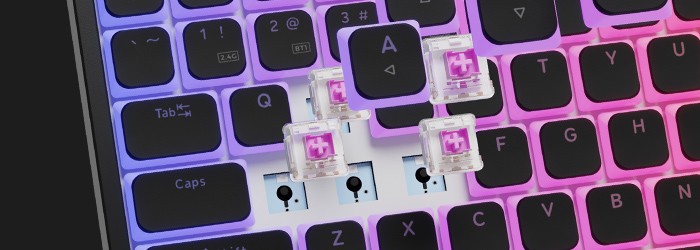
Quick switch replacement? It's possible with Hot-Swap. Source: our own materials.
Who would benefit most from a low-profile keyboard?
- They combine work and gaming at a single workstation—they write a lot of text, code, or work with documents during the day, and in the evening, they expect precision and responsiveness in their games.
- They’re switching from laptops to desktop computers—they want to retain the light keystroke feel they’re used to from laptops, while also gaining the durability of the switch mechanism (around 50 million clicks) and full anti-ghosting.
- They are looking for better ergonomics without having to expand their workstation—they prefer to rest their hands low on the desk without having to buy tall wrist rests.
When opting for a low-profile design, it’s worth paying attention not only to the height of the case itself, but also to the type of switches used, the presence of internal damping, and the build quality of the keycaps. It is these details that determine whether the keyboard will be merely a sleek accessory on your desk or a real asset in your daily work and gaming.
Source: original research.