






Mechanical keyboards are rightly associated with uncompromising precision, lightning-fast response times, and a distinct tactile feedback. However, they are often accompanied by a characteristic, loud sound. In fast-paced competitive gaming or during late-night gaming sessions, this noise can disturb household members and bleed through the microphone into the team chat. What actually determines how loud the keys are? We break down the physics of the keystroke, the anatomy of silent switches, and the Gasket Mount architecture—examining how these solutions change the keyboard’s operating characteristics using the GENESIS Thor 430 TKL Wireless keyboard as an example.
Where does the noise in a mechanical keyboard come from? The physics of keystrokes
Before we move on to methods for silencing the keyboard, it’s worth understanding exactly what generates sound when a key is pressed. Contrary to appearances, the sound doesn’t come from just one component; the main source of noise is the so-called “bottom-out” —the moment when you press a key all the way down, andthe plasticstem strikes the bottom of the switch housing with full force—but that’s not all. The second, equally important source is “top-out,” or the return phase. When you release the pressure, the spring rapidly pushes the stem upward, causing it to strike the top cover of the switch. It is precisely these two mechanical impacts that generate the dominant, high-pitched (though still liked by some) clicking sound.
Resonance of the case and mounting plate (resonance box effect)
Importantly, the sound generated inside a single switch does not disappear immediately. Microvibrations are transmitted directly to the metal mounting plate. If there are empty spaces inside the keyboard’s housing, the structure begins to behave like the body of an acoustic instrument. This results in what’s known as “pinging”— a metallic, ringing reverberation that spreads across the entire desk and lingers for a fraction of a second after a key is pressed. We must also not forget the problems that arise with wide keys, such as Space, Shift, Enter, or Backspace. They require additional support in the form of stabilizers. Construction play between the metal wire and the plastic stabilizer guides often causes rattling as well. In unmuffled designs, this unwanted sound can completely dominate the keyboard’s sound and make life a real nuisance.
Switches Under the Microscope: How Does Switch Design Reduce Decibels?
The foundation of a quiet mechanical keyboard is, of course, the proper selection of switches. They are the first link in the acoustic chain. And while there are truly many types of switches on the market, we generally divide them into two specific subtypes:
- Clicky switches contain a special metal component or a moving cover that intentionally generates a loud, sharp sound when activated.
- Linear switches move up and down smoothly, without a physical sound threshold. The noise they produce stems solely from the mechanical contact between components. As a result, linear switches provide a natural foundation for building a quiet setup.
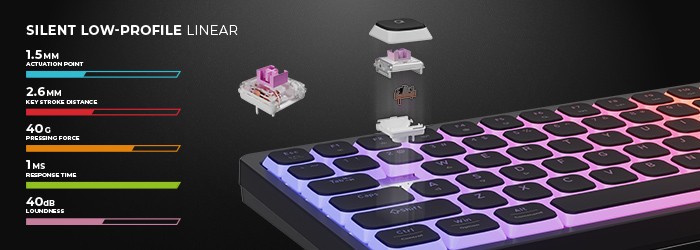
For gamers who demand maximum discretion, dedicated “Silent” switches have been developed. Their secret lies in the design of the switch stem. Small pads made of soft elastomer (rubber or silicone) are placed on the stem’s arms. These act as buffers that dampen the contact between the plastic and the switch housing, both when the switch bottoms out and when it returns to its starting position. The use of these dampers absorbs the impact energy, transforming a sharp click into a muted, soft click.
Factory lubrication (lubing) and its impact on sound and smoothness of travel
Importantly, friction between the dry plastic of the stem and the switch housing’s guides generates a characteristic scratchy sound. Precise, factory lubrication of critical contact points eliminates this effect. Additionally, coating the spring ends with a thicker lubricant reduces its metallic vibrations (spring ping), which directly translates to smoother key operation and a more refined tone.
Gasket Mount—what is it, and why does it set a new standard for playing experience?
So it’s time to answer the question of what the much-talked-about and frequently mentioned “Gasket Mount” in keyboards actually is, because even the best, silent switches won’t reach their full potential if they’re mounted in a rigid and noisy frame. Simply put, Gasket Mount is a mounting method that eliminates direct contact between the switch support plate and the chassis.
In a classic Tray Mount setup, the plate supporting the switches is screwed directly to the base of the case with metal screws. Every keystroke transfers energy directly to the hard body of the device. The Gasket Mount design eliminates direct contact between the plate and the enclosure. The mounting plate, along with the PCB, is suspended on flexible gaskets (made of special silicone or Poron polyurethane foam). The entire key module floats inside the case on shock-absorbing cushions. The flexible gaskets act as an acoustic barrier. They absorb the mechanical energy of the keystrokes before it can translate into vibrations in the outer frame. As a result, the sound is contained within the switch, and its pitch is noticeably reduced. Instead of a loud, high-pitched clatter, the keyboard produces a bass-toned, subdued, and pleasant-sounding click.
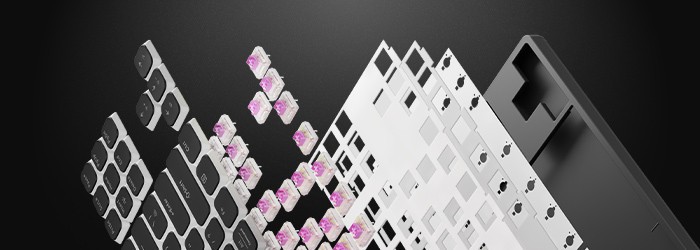
Mounting the panel on flexible gaskets introduces controlled flex to the entire structure. During intense gaming or fast typing, the plate gently cushions the impact of fingers landing on the keys. This reduces the strain on the joints of the hands and wrists, significantly increasing comfort during long hours spent in front of the monitor. Full acoustic control also requires eliminating empty spaces inside the device. Modern designs use multi-layered fillers. Precisely cut EVA or polyurethane foam is placed between the mounting plate and the printed circuit board (PCB) to dampen the space around the switches. The bottom of the case, in turn, is often lined with a molded silicone mat. These layers absorb residual sound waves, eliminating echoes inside the case.
Quiet gaming and wireless freedom: GENESIS Thor 430 TKL Wireless
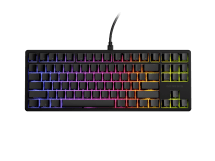
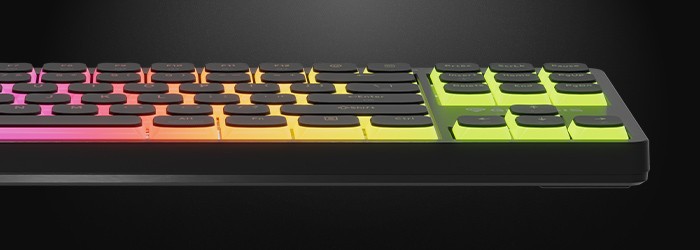
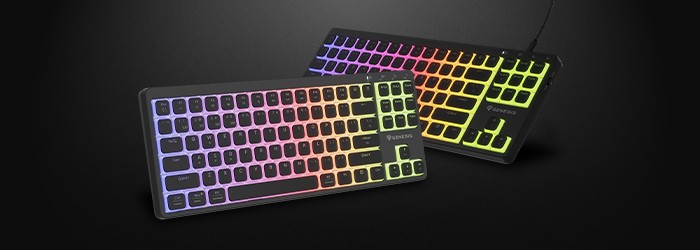
All of these engineering principles have been incorporated into the GENESIS Thor 430 TKL Wireless keyboard. It was designed for users who expect precision from their gaming gear while also valuing impeccable quiet operation and a tidy workspace.
-Gasket Mount Design and Quiet Switches: The combination of gasket-mounted damping and refined switches effectively suppresses unwanted vibrations. The keyboard offers a subdued acoustic profile, allowing you to game at night or stream live without worrying that every keystroke will be picked up by the microphone.
- TKL (Tenkeyless) layout: Removing the numeric keypad reduces the keyboard’s footprint on your desk. This gives you significantly more space to move your mouse freely at low sensitivity, ensuring greater precision and control in dynamic tournament games.
- Triple wireless connectivity mode: The wireless connection eliminates cable clutter on your gaming setup and makes it easy to quickly switch between your desktop, laptop, and console, giving you complete freedom to organize your space.
Summary: How to Set Up a Quiet and Responsive Gaming Setup?
A quiet mechanical keyboard doesn’t mean compromising on responsiveness or gaming comfort. The noise level is determined by specific design features: smooth linear switches with internal dampers, factory lubrication, layers of sound-dampening foam, and the flexible Gasket Mount assembly. A conscious choice of these components allows you to create an ergonomic environment for gaming and work that guarantees full control over gameplay while maintaining comfortable silence.
Source: original research, Google Gemini.